
The digital landscape has evolved, and with it, the expectations for a robust Content Management System.
Today, building a professional WordPress site requires more than just installing plugins; it demands a sophisticated approach to data architecture.
Historically, developers spent hours on manual content management tasks, from registering post types to configuring complex data relationships.
By leveraging modern AI tools, the content creation process has been transformed.
This article explores how to shift your workflow from tedious manual coding to high-level orchestration, enabling you to build complex WordPress environments in mere minutes.
The Evolution of WordPress Development: Beyond Simple Content Generation
WordPress has matured far beyond its roots as a blogging platform.
It is now a powerful enterprise-grade Content Management System capable of managing massive datasets and dynamic ecosystems.
Modern developers no longer just write content; they build engines.
Whether you are creating Custom Post Types for a real estate portal or a bespoke directory, the focus has shifted to architecting Dynamic Content.
By utilizing AI, you can bypass the “boilerplate” phase of development, focusing instead on high-level schema design and user-centric architecture that defines a project’s long-term success.
Why the Manual Approach to CPTs and ACF is a Productivity Bottleneck
The traditional, manual method of clicking through the admin interface to define every Post Type and label is an outdated productivity killer.
Manually configuring Custom Fields and managing field groups is not only slow but also prone to human error, leading to inconsistent data structures that are difficult to scale.
Without automated version control, managing these assets across local, staging, and production environments becomes an administrative nightmare.
To thrive in a competitive market, developers must abandon the “click-and-hope” approach in favor of AI-assisted, code-first workflows.
AI as a Data Architect: Shifting the Workflow from “Coding” to “Orchestrating”
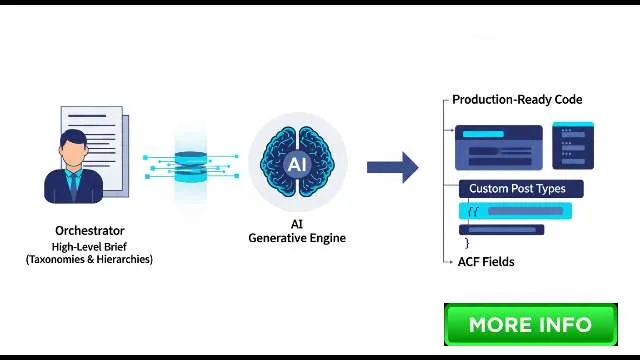
The modern WordPress development workflow: shifting from writing manual boilerplate code to orchestrating high-level data architecture through AI.
When you engage AI as a partner in data architecture, your role shifts from coder to orchestrator.
Instead of asking for basic snippets, you provide a comprehensive brief that outlines the relationships, taxonomies, and hierarchies required for the project.
The AI functions as a generative engine, turning high-level business requirements into clean, production-ready code.
This strategy ensures your site is built on a solid foundation of structured data, effectively future-proofing your build against the complexities of modern web development.
Phase 1: Planning Your Data Model and Taxonomy
Effective development begins before a single line of code is written.
Mapping your core content entities and their relationships is the foundational step in ensuring your project remains scalable, maintainable, and aligned with client expectations.
Defining Client Requirements and Content Relationships
The success of any WordPress project hinges on its data model.
Before engaging your AI assistant, define the “why” behind your content.
Are you linking authors to articles? Are you connecting properties to agents? Clearly articulating these relationships—whether one-to-many or many-to-many—provides the AI with the context needed to structure your database correctly.
This ensures that every Post Type you build is logically connected to the others, facilitating more complex query requirements later on.
Identifying Field Types: From Basic Text Areas to Complex Repeater Fields
Your project’s content requirements dictate the field types you need.
While a standard text field works for simple data, advanced projects often require specialized tools like Repeater fields, Flexible Content, or complex Gallery Field modules.
By identifying these requirements during the planning phase, you ensure the AI generates the precise ACF fields and configurations needed for your specific use case, saving you from having to rework your backend structure once the client starts entering live data.
Structuring Hierarchies: When to Use Categories vs.
Custom Taxonomies
Taxonomies are the backbone of site navigation and content discoverability.
Deciding when to use native categories versus a custom taxonomy is critical.
If your content requires a unique organizational structure that doesn’t fit standard blogging conventions, a custom taxonomy is the superior choice.
Defining these hierarchies early allows you to build a more intuitive admin interface, which directly improves the client’s efficiency and overall user experience.
Crafting the “Master Prompt”: Converting Business Needs into Technical Schemas
The output quality of an AI is directly tied to the input quality of the AI prompt.
A professional global prompt should define the specific Post Type intent, the required Custom Fields, and the Schema.org requirements.
For example, instructing your AI to “Act as a WordPress architect to create a ‘Project’ custom post type with ACF fields mapped to Schema.org vocabulary for Service schemas” provides the technical guardrails necessary for a highly professional, search-optimized result.
Using Context-Aware AI to Map Complex Relationships (Relationships, Post Objects, and Clones)
Mapping relationships is often the most complex part of CMS design.
You can prompt your AI to generate arguments for Post Object or Relationship fields, ensuring that your field groups are perfectly synced with your Post Types.
By leveraging the Model Context Protocol, you can feed the AI existing theme or plugin context, ensuring that its generated output adheres strictly to the architectural patterns already established in your development environment.
Training the LLM on your Specific Development Environment (Theme-based vs.Plugin-based)
Every development environment has its quirks.
Whether you are working within a custom theme or a dedicated functionality plugin, it is vital to inform the AI of your environment.
This ensures that generated code is placed in the correct file path—such as inc/cpt-setup.
php—and adheres to your specific naming conventions, creating a cohesive codebase that is easy for other developers to navigate.
Generating register_post_type Snippets for functions.php
Once your architecture is defined, the AI can generate high-quality register_post_type snippets in seconds.
Instead of generic boilerplate, you get customized functions that reflect your exact requirements for labels, support for ACF Blocks, and REST API visibility.
This ensures that every new Post Type is registered with the correct parameters, allowing for seamless integration with Gutenberg and external third-party services.
Utilizing AI to Configure Advanced CPT Arguments (REST API, Support for Gutenberg, and Custom Icons)
Modern WordPress development requires more than just basic registration.
Use AI to configure advanced arguments like show_in_rest for Gutenberg compatibility and specific capabilities for administrative access.
AI can also suggest the perfect dashicons for your custom post type to ensure your admin interface is visually consistent and professional.
This attention to detail ensures your post types behave like native WordPress objects, ready for modern editor experiences.
Leveraging WP-CLI Commands via AI for Rapid Local Deployment
For developers who prioritize speed, WP-CLI commands are essential.
You can prompt the AI to generate a sequence of commands to register post types, create taxonomy structures, and assign core settings.
Running these commands locally allows you to scaffold an entire project architecture in less time than it would take to browse a single menu in the dashboard.
Method A: Generating ACF JSON for Direct Import and Synchronization
The gold standard for handling Advanced Custom Fields is through ACF JSON files.
By instructing your AI to output the full JSON configuration for your field groups, you can import these settings directly into your WordPress installation.
This process ensures that your field configurations are identical across environments, eliminating the risk of mismatched settings and providing a cleaner deployment pipeline.
Method B: Writing PHP Field Group Definitions for Version-Controlled Projects
For teams utilizing Git, generating PHP-based field group definitions is the safest route for long-term version control.
By having the AI write the programmatic registration code, you ensure that field definitions are treated as part of the application logic.
This approach prevents the conflicts often caused by database-driven configurations, ensuring that all developers on your team are working with the exact same field architecture.
Automating Validation Rules and Conditional Logic through AI Prompts
Complexity often arises through conditional logic—where fields only appear based on previous user input.
AI excels at mapping these dependencies.
Simply describe the business logic to your generative engine (e.g., “Only show the ‘Call to Action’ Flexible Content module if the ‘Show Button’ toggle is enabled”), and the AI will write the exact PHP or JSON configuration required to implement these rules flawlessly.
Incorporating Specialized Field Types: Gallery Fields, Flexible Content, and Options Pages
Whether you are managing complex imagery with a Gallery Field or building a powerful layout engine with Flexible Content, AI can define these sophisticated components with precision.
You can even prompt the AI to generate the registration code for Options Pages, allowing you to create global site settings for branding and API keys that are accessible across your entire site.
Implementing ACF JSON Synchronization for Seamless Deployment
Consistency is the hallmark of professional development.
By utilizing ACF JSON synchronization, you treat your fields as code.
When you push updates from your local environment to staging, the system automatically detects the updated JSON file and prompts an update.
This eliminates the “UI drift” that often happens in complex projects, ensuring your field definitions remain locked to your project’s version history.
Managing Bulk Field Creation using AI and Spreadsheet-Based Tools
For enterprise-level projects with hundreds of fields, manual creation is impossible.
You can prompt an AI to convert a structured spreadsheet of requirements into a comprehensive JSON schema.
Tools like WP Sheet Editor can then be used to manage and bulk-edit the resulting data, ensuring that your architecture remains uniform and compliant with your project’s scope as it expands.
Organizing the Admin Interface for Optimal Client Content Management
A clean admin interface is just as important as the code behind it.
Use AI to organize your field groups into logical tabs, sections, and locations.
By focusing on the client’s user experience during the architectural phase, you ensure the final product is intuitive, requiring minimal training and reducing the likelihood of data entry errors.
Creating Single Post and Archive Page Templates (single-post_type.php)
With your data model ready, the AI can assist in generating the template files required for your front-end display.
By providing the AI with your preferred layout and field keys, you can rapidly scaffold single-{post-type}.
php and archive-{post-type}.
php page templates, ensuring your content is rendered with full support for responsive design and semantic HTML.
Using AI to Generate Query Loop Logic for Custom Post Types
Querying custom data often requires complex WP_Query arguments or advanced block-based logic.
AI can generate optimized query loops that respect your taxonomy filters, meta queries, and sorting requirements.
This allows you to build sophisticated front-end features, like filtered archives or related content sections, without wasting hours on manual query debugging.
Displaying Dynamic Content: Mapping ACF Fields to Gutenberg Blocks and Page Templates
The final step is connecting your backend data to the front end.
AI can assist in writing the code that retrieves values via the WordPress Abilities API and maps them to ACF Blocks.
By providing the AI with your design preferences, you can ensure that every piece of dynamic content is rendered exactly as intended, providing a seamless, fast, and performant user experience that scales with your site.
Conclusion
Building professional WordPress infrastructure no longer needs to be a manual, high-effort task.
By leveraging AI as your primary Data Architect, you can move from abstract business requirements to a fully realized, structured data model in a fraction of the time.
The shift from manual UI configuration to ACF JSON synchronization and AI-assisted code generation represents a significant leap in professional development maturity.
This workflow does more than improve your personal velocity; it ensures your projects are scalable, version-controlled, and easily maintainable.
To begin, map your models, define your taxonomies, and embrace the power of AI-driven orchestration to handle the heavy lifting of WordPress architecture.
